
Why spreadsheets, Access databases, and homegrown trackers fall short of NIST SP 800-171
Every defense contractor holding government property knows the recordkeeping obligation. FAR 52.245-1 requires you to establish and maintain property records as part of an approved property management system, and your Property Management System Analysis (PMSA) already tests whether those records are complete and accurate.
CMMC adds a second test. Since November 2025, applicable new DoD contracts involving Controlled Unclassified Information have carried DFARS 252.204-7021, making a current CMMC Level 2 status a condition of award. The third-party certification step (Phase 2) was paused in July 2026, but the requirements themselves were not: your organization still self-assesses against the 110 security requirements of NIST SP 800-171, posts an SPRS score, and has a senior official affirm compliance every year. Many contractors are also still pursuing C3PAO certification, often because their primes require it. Whoever does the evaluating, they will not care how accurate your property records are. They will care about the system those records live in, and whether it satisfies NIST SP 800-171.
For contractors tracking government property in Excel workbooks, Access databases, or any other system not purpose-built for government property management, this is where two compliance worlds collide. A recordkeeping approach that has passed every property audit you have ever had can still be a source of findings in a CMMC assessment.
(For the full background on the Phase 2 suspension and what remains in force, see our companion article: [The Most Common CMMC Compliance Failure for Government Property Systems, Authentication].)
Why Property Records Are in Your CUI Boundary
Government property records are not generic inventory data. They tie specific items to specific contracts and programs: contract numbers, item descriptions and identification data, unit acquisition costs, custodial and location history, and disposition records. Depending on the program, that information is frequently CUI or is inseparable from workflows that handle CUI.
The CUI boundary is defined by where CUI is processed, stored, or transmitted, not by which systems your IT department considers important. If your property records contain or touch CUI, the spreadsheet, database, or application holding them is inside the boundary, and every applicable NIST SP 800-171 requirement applies to it.
This Is Not Just a Spreadsheet Problem
The gap is easiest to see with a shared workbook, but many contractors are running government property through tools that are commercially supported and still fall short in two distinct ways.
Lightweight asset and inventory tracking tools. Barcode-driven check-in and check-out applications are built for tracking company equipment, not for holding CUI. Logins and basic permissions are common; granular role-based access control, tamper-protected audit trails, and FIPS-validated cryptography generally are not. Just as important, these tools were never designed to produce the records FAR 52.245-1 requires: property accountable to a specific contract, custodial history, acquisition data, physical inventory support, and documented disposition.
The fixed asset module of your ERP or accounting system. Even ERP platforms built specifically for government contractors are engineered around a different problem: capitalizing and depreciating assets your company owns. Government property is not on your books. It is accountable by contract, moves between custodians, locations, and subcontractors, requires physical inventories and loss reporting, and ends in a formal disposition process. A fixed asset ledger has no natural home for most of that lifecycle. And when the system of record cannot do the job, the workaround is always the same: exports into spreadsheets, which reintroduces every control failure described below.
The common thread: the question is not whether a vendor supports the tool. It is whether the tool was purpose-built to hold government property records, which are frequently CUI, inside a system that satisfies both FAR 52.245-1 and NIST SP 800-171.
Where General-Purpose Tools Break Down, Family by Family
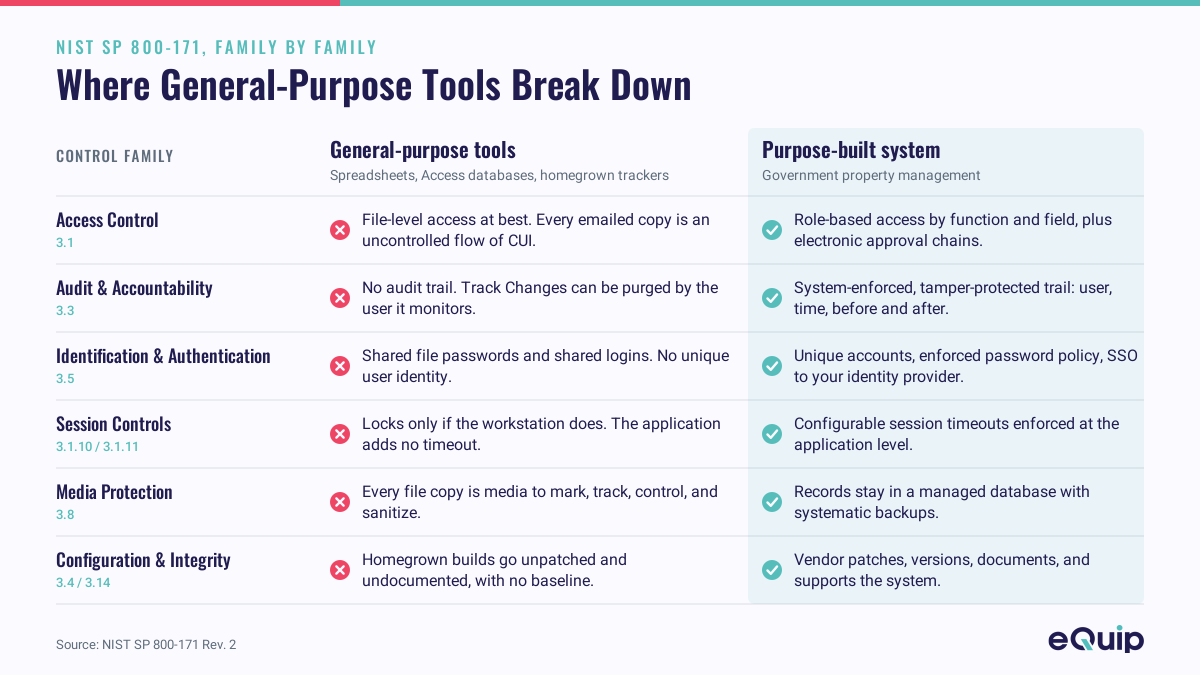
NIST SP 800-171 organizes its requirements into families. Walk through the ones most relevant to a property recordkeeping system, and the gap between general-purpose tools and a purpose-built government property management system becomes concrete.
Access Control (3.1): Who can see and do what
The requirements: limit system access to authorized users (3.1.1), limit users to the transactions and functions they are authorized to perform (3.1.2), enforce least privilege (3.1.5), separate duties to reduce risk of malevolent activity (3.1.4), and control the flow of CUI (3.1.3).
A spreadsheet on a shared drive offers file-level access at best: anyone who can open it can typically read, edit, or delete anything in it. There is no concept of a property custodian who can update locations but not acquisition costs, or a viewer who can run reports but not modify records. Worse, spreadsheets replicate. Every emailed copy and local download is an uncontrolled flow of CUI that no one is tracking. Access databases and most homegrown tools are only marginally better; role-based permissions, if they exist at all, are coarse and rarely documented.
A purpose-built government property system enforces role-based access control at the function and field level: custodians, property administrators, auditors, and read-only users each see and do only what their role permits, and CUI stays inside a controlled application boundary instead of scattering across inboxes. Separation of duties (3.1.4) gets equally concrete: eQuip includes pre-configured electronic approval chains for property transfers between locations, to an individual, or to another contract, and approval workflows can be configured for practically any process where a second set of eyes is required. A spreadsheet’s version of an approval chain is an email thread.
Audit and Accountability (3.3): Proving who did what, when
The requirements: create and retain audit records sufficient to enable monitoring and investigation (3.3.1), ensure actions can be traced to individual users (3.3.2), use authoritative time stamps (3.3.7), and protect audit information from unauthorized modification or deletion (3.3.8).
This family is where spreadsheets fail outright. Excel has no audit trail. You cannot tell who changed a quantity, deleted a row, or altered an acquisition cost, or when. “Track changes” is not a solution for 3.3.8. It can be switched off or purged by the same user it is supposed to monitor, and Excel offers no way to protect a change history from the people editing the workbook. On this requirement, a spreadsheet is a complete failure. Access and homegrown tools rarely do better; even when a developer added a log table, it is usually editable by anyone with database access.
A purpose-built government property management system generates a system-enforced audit trail: every create, update, and delete stamped with the user, the time, and the before-and-after values, retained and protected from tampering. This also happens to be exactly the accountability your property administrator wants during a PMSA, which is why this control is a double win.
Identification and Authentication (3.5): Knowing who is in the system
The requirements: identify users uniquely (3.5.1), authenticate them before granting access (3.5.2), enforce multi-factor authentication (3.5.3), enforce password complexity and prohibit reuse (3.5.7 through 3.5.9), and manage identifiers and authenticators over their lifecycle.
Shared spreadsheets have no per-user authentication at all; a file password shared by the team is the opposite of unique identification. Legacy Access security models are deprecated, and homegrown tools frequently ship with shared logins or locally stored passwords that satisfy no modern policy.
A purpose-built government property system provides unique accounts and enforced password policy, and, critically, can integrate with your enterprise identity provider via single sign-on (SSO), so your organization’s MFA, password, and session policies govern the property system automatically.
Session Controls (3.1.10, 3.1.11): Walking away from the screen
Session lock with pattern-hiding displays and automatic session termination after inactivity are testable, observable requirements. A spreadsheet left open on an unattended workstation locks only if the workstation does; the application layer contributes nothing. Purpose-built government property systems enforce configurable session timeouts at the application level.
Media Protection (3.8) and CUI Handling
The requirements include protecting CUI on system media, marking media with CUI markings (3.8.4), controlling access to media, and protecting backups (3.8.9).
When your property record is a file, every copy is media to be controlled, marked, tracked, and eventually sanitized. That burden multiplies with each duplicate. When your property record lives in a database behind an application, the media protection problem collapses to the managed environment hosting it, with backups handled systematically rather than by whoever last remembered to copy the file.
Configuration Management (3.4) and System Integrity (3.14)
Baseline configurations, change control, flaw remediation, and protection against malicious code assume someone owns the system’s lifecycle. Homegrown tools are the quiet risk here: the developer who built the Access database or internal web app may have left the company years ago, nobody patches it, changes are undocumented, and no one can produce a baseline configuration when it is time to assess. A commercially supported system comes with a vendor who patches, versions, documents, and supports it. Hosted eQuip deployments run in a government cloud environment, with FIPS-validated cryptography protecting CUI in transit and at rest, directly supporting the System and Communications Protection requirements (3.13.8, 3.13.11).
The Bottom Line for Contractors Without a Purpose-Built Government Property System
If your government property records live in spreadsheets, an Access database, a lightweight asset tracking tool, an ERP fixed asset module, or an in-house build, you have two options before your Level 2 assessment: attempt to wrap enterprise-grade controls around a tool that was never designed for them, or move the records into a government property management system where those controls are available out of the box.
The first path introduces a risk that is effectively unmanageable. Every control has to be bolted on, documented, and defended by hand, and any one of them can fail. That can easily lead to compliance failure, unnecessary costs, and reputational damage with the primes and agencies you depend on for work.
The second path is direct, and faster than most contractors expect. eQuip is built specifically for government property management under FAR 52.245-1, and the controls described in this article are available out of the box: role-based access control, a system-enforced audit trail, electronic approval chains, session management, and hosting in a government cloud environment with FIPS-validated cryptography. Implementations can be completed in as little as 30 days.
Your next affirmation, your next bid, or your prime’s next supplier review will not wait for the policy debate to settle. Move your government property records to eQuip, and let us be the partner that helps eliminate CMMC compliance risk for your government property management system.
Primary Sources
- 32 CFR Part 170 (CMMC Program Rule): https://www.ecfr.gov/current/title-32/subtitle-A/chapter-I/subchapter-D/part-170
- DFARS 252.204-7021: https://www.acquisition.gov/dfars/252.204-7021-contractor-compliance-cybersecurity-maturity-model-certification-level-requirements.
- NIST SP 800-171 Rev. 2: https://csrc.nist.gov/pubs/sp/800/171/r2/upd1/final
- DoD CIO CMMC Program page: https://dodcio.defense.gov/cmmc/
- FAR 52.245-1, Government Property: https://www.acquisition.gov/far/52.245-1
- DoW CIO suspension of CMMC Phase 2 (July 13, 2026), implementing memorandum: https://dodcio.defense.gov/Portals/0/Documents/Library/ImplementingSuspensionCMMC-PhaseII.pdf
- Class Deviation 2026-O0025, Revision 3 (September 3, 2026): https://www.acq.osd.mil/dpap/dars/dfars_far_overhaul_class_deviations.html
This article is provided for general informational purposes and does not constitute legal or compliance advice. Consult your legal counsel and CMMC advisors regarding your organization’s specific obligations.
Last reviewed: November 2026
